
A Zigbee mesh network is the reason a well-planned wireless smart home can feel as dependable as a wired one. Instead of every device shouting to one router, Zigbee devices pass messages to each other, so the network gets stronger with every switch you add.
This guide explains Zigbee architecture in plain language and shows how to plan Zigbee home automation for a finished apartment in Gurgaon, Delhi or Noida.
What Zigbee is
Zigbee is a low-power wireless standard built on IEEE 802.15.4 and run by the Connectivity Standards Alliance, the same group behind Matter. It uses the 2.4 GHz band worldwide, including India. Zigbee 3.0 unified the older Zigbee profiles, so certified devices from different brands can join the same network. For how it compares with KNX and Matter, see our guide to smart home protocols.
The three roles in a Zigbee network
Every Zigbee device plays one of three roles, and planning a reliable network is mostly about getting the mix right.
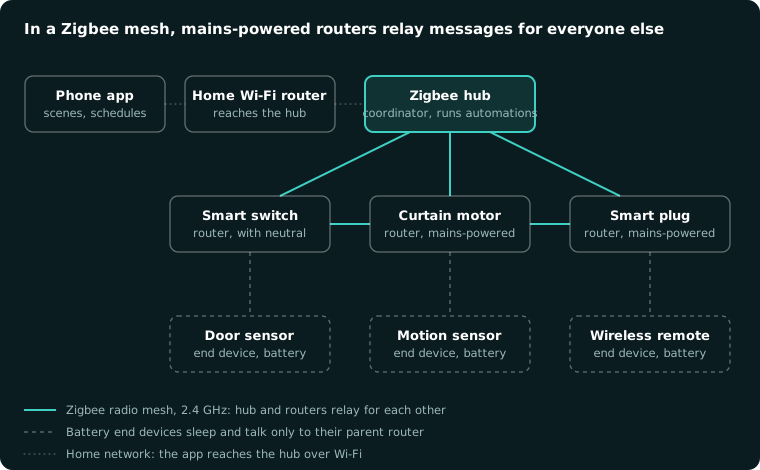
1. Coordinator. There is exactly one, inside your Zigbee hub or gateway. It forms the network, admits new devices and holds the security key. The hub also connects to your home network, so the app and voice assistants can reach it.
2. Routers. Mains-powered devices — smart switches with a neutral wire, smart plugs, many smart bulbs and curtain motors — stay awake all the time and relay messages for their neighbours. They are the backbone of the mesh.
3. End devices. Battery-powered devices such as door sensors, motion sensors and wireless remotes sleep most of the time to save power. Each one talks only to its nearest router, called its parent.
How messages travel through the mesh
When you press a wireless remote in the bedroom, it wakes, sends the command to its parent router, and the message hops from router to router until it reaches the right light or the hub. If a router disappears — someone switches off a smart bulb at the wall — the network finds another route. This is what people mean when they call Zigbee "self-healing".
The more routers you have, the more paths there are, and the more reliable the whole system becomes.
Zigbee hubs, apps and local control
The hub runs your automations — "turn on the corridor light when motion is detected after sunset" — locally, so they keep working even if the internet drops. The app reaches the hub through your home Wi-Fi, and remote access from outside goes through the internet. Many hubs can also act as a Matter bridge, so Zigbee devices appear in Apple Home, Google Home and Alexa.
Channels and Wi-Fi interference
Zigbee and Wi-Fi share the 2.4 GHz band. Zigbee has 16 channels (11 to 26); Wi-Fi in most homes uses channels 1, 6 or 11. Placing Zigbee on channel 15, 20 or 25 keeps it in the gaps between busy Wi-Fi channels. A good installer checks your Wi-Fi before choosing the Zigbee channel.
Security
Zigbee 3.0 encrypts traffic with AES-128, and devices join using a network key held by the coordinator. Many devices also support install codes, which make pairing more secure. Keep the hub's firmware up to date, and remove devices you no longer use.
Planning a Zigbee network for an Indian apartment
- Put the hub in the middle of the home, not inside a metal cabinet or the ISP router's corner.
- Plan routers in every room. Concrete and stone walls common in NCR buildings weaken 2.4 GHz signals; mains-powered switches or plugs in each room keep the mesh strong.
- Check for neutral wires. Many smart switches without a neutral act only as end devices, not routers. Where possible, choose neutral-wire switches.
- Add battery sensors after the routers, so each one has a strong parent nearby.
- Use one hub and one app, not separate hubs for each brand.
Zigbee vs Wi-Fi smart devices
Wi-Fi devices are easy to buy, but each one joins your home router directly. A whole house of them crowds the network, and many stop responding when the internet drops. Zigbee devices use far less power, mesh with each other, and run automations locally on the hub, which is why we prefer Zigbee for whole-home wireless automation.
Frequently asked questions
What are the three types of Zigbee devices?
Coordinator (the hub), routers (mains-powered devices that relay messages) and end devices (battery devices that talk to a nearby router).
Does Zigbee need Wi-Fi or the internet?
Zigbee devices talk to each other and the hub without Wi-Fi. The hub uses your home network so the app can reach it; automations keep running locally if the internet drops.
How many devices can a Zigbee network have?
A Zigbee network can address far more devices than any home needs. In practice, reliability depends on having enough routers spread through the home, not on the device count.
Is Zigbee good for Indian homes?
Yes, for finished apartments where walls cannot be opened. Plan routers in every room, because thick concrete walls weaken the signal. For new builds, compare it with KNX wiring.
Want whole-home automation without breaking walls? CLEUB plans and installs Zigbee smart homes in finished apartments across Gurgaon, Delhi and Noida. Book a consultation and we will map your Zigbee network room by room.